Authentication Solutions
身份驗證方案比較與實作流程。
Session & Cookie
  sequenceDiagram
    participant C as Client
    participant S as Server

    C ->> S: User Login {username, password}
    S ->> S: Create and Store Session in Server Memory
    S ->> C: Set-Cookie: session-id=1234567
    C ->> S: GET /user/data Cookie: session-id=1234567
    S ->> S: Compare session-id with stored data
    S ->> C: Response with user data
OAuth 2.0
詳細協定說明請參考 OAuth 2.0 協定。
  sequenceDiagram
    participant RO as Resource Owner(User)
    participant Client
    participant RS as Resource Server
    participant AS as Authorization Server

    RO->>Client: 點擊「登入 Google」
    Client->>AS: 重定向至 Google 授權頁面
    RO->>AS: 授權應用程式訪問 Google 資源
    AS->>RO: 返回授權碼(grant code)
    Client->>RS: 發送授權碼至 Backend Server
    RS->>AS: 使用授權碼請求 Access Token
    AS->>RS: 返回 Access Token 和 Refresh Token
    RS->>RS: 使用 Access Token 訪問 Google 資源
    RS->>Client: 回應處理結果
    Client->>RO: 顯示結果給使用者
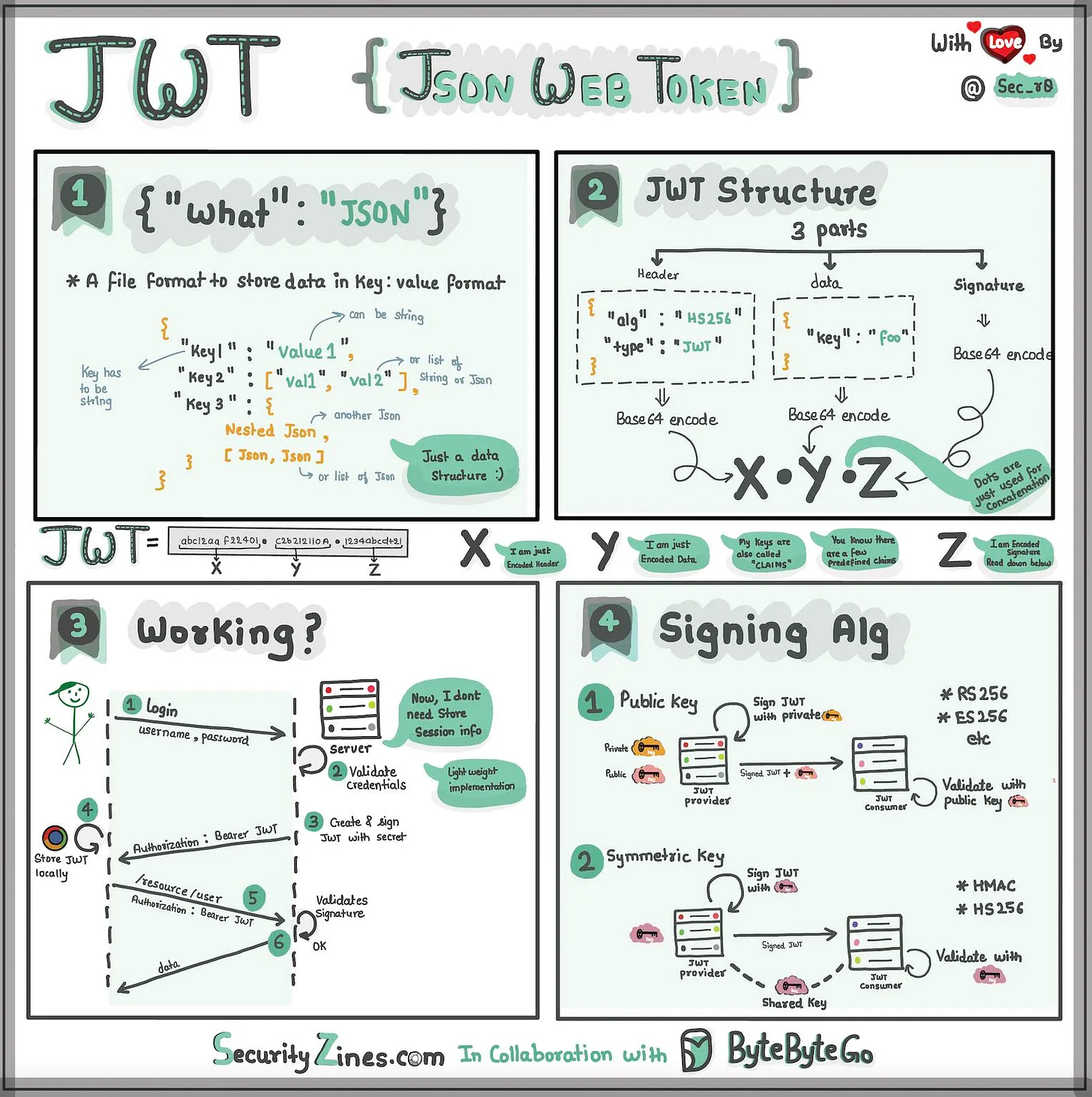
JWT
Passkeys
Passkeys 是基於 FIDO2 標準的無密碼驗證方案。
驗證器類型
Platform Authenticators(內建於裝置):
- TouchID / FaceID
- Windows Hello
- 手機內建驗證器
Roaming Authenticators(外部裝置):
- USB 安全金鑰
- NFC
- Bluetooth
Attestation(建立 Passkey)
  sequenceDiagram
    participant U as User
    participant A as Authenticator
    participant C as Client
    participant S as Server

    U --> C: Click Register
    C ->> S: Get challenge
    S ->> S: Create challenge [87cnN44C..]
    S -->> C: Return challenge
    C ->> A: credentials.create(challenge)
    A -->> U: Request verification
    U ->> U: Biometric / PIN
    U ->> A: Verified
    A ->> A: Create Keypair, Sign challenge
    A ->> A: Store private key
    A ->> C: [challenge✅, ID, public key]
    C ->> S: Send public key and signed challenge
    S ->> S: Verify signature, Store public key
    S -->> C: Passkey Created
Assertion(使用 Passkey 登入)
  sequenceDiagram
    participant U as User
    participant A as Authenticator
    participant C as Client
    participant S as Server

    U ->> C: Sign in with passkey
    C ->> S: Get challenge
    S ->> S: Create challenge
    S -->> C: [87cnN44C..]
    C --> A: credentials.get(challenge)
    A --> U: Request verification
    U ->> U: Biometric / PIN
    U ->> A: Verified
    A ->> A: Sign challenge
    A -->> C: [challenge✅, credential ID, Username]
    C ->> S: [challenge✅, credential ID, Username]
    S ->> S: Verify with public key
驗證方案比較
Basic Authentication
| 項目 | 說明 |
|---|---|
| 驗證方式 | 每個請求發送 username/password |
| 安全性 | Base64 編碼,容易解碼 |
| 無狀態性 | 是 |
| 撤銷機制 | 難以撤銷 |
| 適用場景 | 簡單 API、內部系統 |
Token-Based Authentication
| 項目 | 說明 |
|---|---|
| 驗證方式 | 每個請求發送 Token(通常是 JWT) |
| 安全性 | Token 可簽名和加密 |
| 儲存方式 | LocalStorage 或 Cookie |
| 無狀態性 | 是 |
| 撤銷機制 | 可設定過期或使其失效 |
| 適用場景 | 現代 API、手機/網頁應用 |
Session Authentication
| 項目 | 說明 |
|---|---|
| 驗證方式 | 伺服器建立 Session,透過 Cookie 傳送 Session ID |
| 安全性 | 高,基於伺服器儲存的 Session |
| 無狀態性 | 否,依賴伺服器儲存 |
| 撤銷機制 | 可撤銷 Session 或使其過期 |
| 適用場景 | 需要用戶會話的 Web 應用 |
API Key Authentication
| 項目 | 說明 |
|---|---|
| 驗證方式 | 使用預先產生的 API Key |
| 安全性 | 較低,容易被竊取或濫用 |
| 儲存方式 | 環境變數或設定檔 |
| 無狀態性 | 是 |
| 撤銷機制 | 需更換或撤銷 |
| 適用場景 | 公開 API、無需用戶登入的應用 |
OAuth 2.0
| 項目 | 說明 |
|---|---|
| 驗證方式 | 第三方應用訪問資源,無需暴露用戶憑證 |
| 安全性 | 支援第三方授權,安全性高 |
| 無狀態性 | 是,適合分散式系統 |
| 撤銷機制 | Token 過期或失效 |
| 適用場景 | 第三方應用授權,如 Google 登入 |
OpenID Connect (OIDC)
| 項目 | 說明 |
|---|---|
| 驗證方式 | 基於 OAuth 2.0 加上身份驗證層 |
| 安全性 | 更高,專為身份驗證設計 |
| 無狀態性 | 是,支援 SSO |
| 撤銷機制 | Token 過期,可由身份提供者撤銷 |
| 適用場景 | 單點登入(SSO)、身份驗證 |
Multi-Factor Authentication (MFA)
| 項目 | 說明 |
|---|---|
| 驗證方式 | 基本驗證 + 第二層驗證(SMS、TOTP) |
| 安全性 | 額外安全層,防止憑證被盜 |
| 用戶體驗 | 需要額外操作 |
| 適用場景 | 高敏感系統 |
Biometric Authentication
| 項目 | 說明 |
|---|---|
| 驗證方式 | 指紋、面部、虹膜等生物特徵 |
| 安全性 | 高,難以模仿 |
| 用戶體驗 | 便捷,但需硬體支援 |
| 適用場景 | 金融應用、手機解鎖 |
Passkey
| 項目 | 說明 |
|---|---|
| 驗證方式 | 基於 FIDO2 的無密碼驗證 |
| 安全性 | 極高,無需密碼 |
| 用戶體驗 | 便捷,無需記憶密碼 |
| 適用場景 | 高安全性系統、無密碼登入服務 |