Context
Go 言語の Context:キャンセルシグナル、デッドライン、リクエストスコープ値。
Context 概念
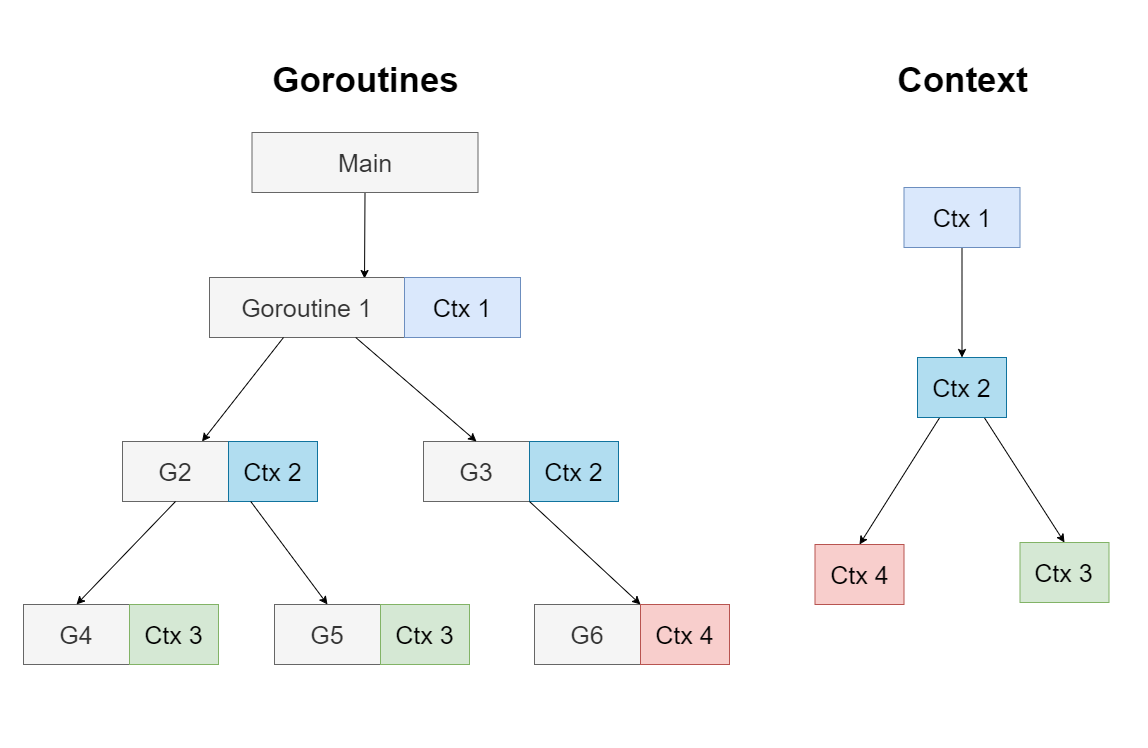
Context は API 境界とプロセス間でデッドライン、キャンセルシグナル、リクエストスコープ値を伝達するために使用。
いつ Context を使うか?
- Incoming requests(リクエストの受信)
- Outgoing requests(リクエストの送信)
Context を使用する標準ライブラリ
netdatabase/sqlos/exec
WithCancel
手動でキャンセルするために使用。
func main() {
    ctx, cancel := context.WithCancel(context.Background())
    defer cancel()

    go worker(ctx, "worker-1")

    time.Sleep(3 * time.Second)
    cancel() // キャンセルシグナルを送信
    time.Sleep(time.Second)
}

func worker(ctx context.Context, name string) {
    for {
        select {
        case <-ctx.Done():
            fmt.Printf("%s: received cancel signal\n", name)
            return
        default:
            fmt.Printf("%s: working...\n", name)
            time.Sleep(500 * time.Millisecond)
        }
    }
}
WithTimeout
指定時間後に自動キャンセル。
func fetchData(ctx context.Context) error {
    ctx, cancel := context.WithTimeout(ctx, 2*time.Second)
    defer cancel()

    select {
    case <-time.After(3 * time.Second): // 長時間操作をシミュレート
        return nil
    case <-ctx.Done():
        return ctx.Err() // context deadline exceeded
    }
}
HTTP リクエストタイムアウト
func fetchURL(url string) error {
    ctx, cancel := context.WithTimeout(context.Background(), 5*time.Second)
    defer cancel()

    req, _ := http.NewRequestWithContext(ctx, "GET", url, nil)
    resp, err := http.DefaultClient.Do(req)
    if err != nil {
        return err // タイムアウトは context deadline exceeded を返す
    }
    defer resp.Body.Close()
    return nil
}
WithDeadline
指定時刻に自動キャンセル。
func main() {
    deadline := time.Now().Add(5 * time.Second)
    ctx, cancel := context.WithDeadline(context.Background(), deadline)
    defer cancel()

    select {
    case <-time.After(10 * time.Second):
        fmt.Println("operation completed")
    case <-ctx.Done():
        fmt.Println("deadline exceeded:", ctx.Err())
    }
}
WithValue
リクエスト間で共有値を渡す、リクエスト ID や認証情報の伝達によく使われる。
type contextKey string

const (
    userIDKey    contextKey = "userID"
    requestIDKey contextKey = "requestID"
)

func main() {
    ctx := context.Background()
    ctx = context.WithValue(ctx, userIDKey, "user-123")
    ctx = context.WithValue(ctx, requestIDKey, "req-456")

    handleRequest(ctx)
}

func handleRequest(ctx context.Context) {
    userID := ctx.Value(userIDKey).(string)
    requestID := ctx.Value(requestIDKey).(string)
    fmt.Printf("User: %s, Request: %s\n", userID, requestID)
}
WithValue でオプションパラメータを渡すことは避けてください。Context value は API とプロセス境界を越えるリクエストスコープデータにのみ使用すべき。
Context 伝播パターン
チェーン伝達
func main() {
    ctx := context.Background()
    ctx, cancel := context.WithTimeout(ctx, 10*time.Second)
    defer cancel()

    if err := serviceA(ctx); err != nil {
        log.Fatal(err)
    }
}

func serviceA(ctx context.Context) error {
    // 独自のタイムアウトを追加可能
    ctx, cancel := context.WithTimeout(ctx, 5*time.Second)
    defer cancel()

    return serviceB(ctx)
}

func serviceB(ctx context.Context) error {
    // 親 context のデッドラインを使用
    select {
    case <-ctx.Done():
        return ctx.Err()
    default:
        // ビジネスロジックを処理
        return nil
    }
}
データベース操作
func queryUser(ctx context.Context, db *sql.DB, id int) (*User, error) {
    ctx, cancel := context.WithTimeout(ctx, 3*time.Second)
    defer cancel()

    row := db.QueryRowContext(ctx, "SELECT * FROM users WHERE id = ?", id)
    var user User
    if err := row.Scan(&user.ID, &user.Name); err != nil {
        return nil, err
    }
    return &user, nil
}
Links
Timeouts
Timeout は外部リソースへの接続や実行時間を制限する必要があるプログラムに重要。
- Links: Timeouts Example
Timers
将来のある時点で一度だけ操作を実行したい場合に使用。
timer := time.NewTimer(2 * time.Second)
<-timer.C
fmt.Println("Timer fired")

// キャンセル可能
timer2 := time.NewTimer(time.Second)
go func() {
    <-timer2.C
    fmt.Println("Timer 2 fired")
}()
timer2.Stop() // timer をキャンセル- Links: Timers Example
Tickers
一定間隔で繰り返し操作を実行したい場合に使用。
ticker := time.NewTicker(500 * time.Millisecond)
done := make(chan bool)

go func() {
    for {
        select {
        case <-done:
            return
        case t := <-ticker.C:
            fmt.Println("Tick at", t)
        }
    }
}()

time.Sleep(2 * time.Second)
ticker.Stop()
done <- true- Links: Tickers Example